
Nipunta institute seats · per student, per batch
Your students already practise free. This tells you who actually did.
The seat is sold as Nipunta — one programme, reasoning and quant, one batch report a week. Quant Daily gives every aspirant a timed daily quant drill at no cost; what an institute buys is the other half: a console over your batch — who practised, how often, how accurate, how fast, and which topic to spend Tuesday on.
Sources: SSC CGL 2026 notification — 12,256 posts against 28,52,665 applications received. IBPS CRP PO/MT-XVI — 7,565 posts, and CRP SPL (Specialist Officer) 2026 — 1,043 posts, both as revised to 27 August 2026.
At those ratios, prelims cut-offs are not decided by who knows the syllabus. They are decided by seconds per question.
The seat is sold as one programme, under its own name: Nipunta. Reasoning and quantitative aptitude on one roster, one batch code and one console — because a prelims cut-off is decided by both, and no owner wants to buy them twice. Everything below is the quant half of that seat, photographed. The programme's own page — the reasoning half alongside this one, the price card, the free trial and the Founding programme — is at nipunta.com; nothing is priced here, so the number you read there is the number every rep quotes.
What's in a seat
What you're buying
This is the institute side, and it is the whole product. No question banks to write, no content calendar, nothing to install.
The chain roll-up
Running more than one batch? One screen above the consoles ranks your batches quietest-first, so the branch that went quiet this week is the top row rather than something you find by opening six consoles. You attach your own batches to it yourself.
The teacher console
One row per student: rounds attempted, accuracy, average seconds, days practised, days practised in the last 7, when they were last active, and their weakest topic. Sorted quietest first, because a leaderboard already tells you who is winning. Export the lot as CSV.
A weekly speed-test window
You set the window, the batch sits it, the board ranks it. The fixed ritual is what makes them open the app on a day you choose.
Your branding, on a link of your own
Institute name, logo and colour on the batch board, and on the join screen a student sees before they enter. Every institute also gets a branded front door — nipunta.com/i/yourinstitute — free, from day one. Students join with your batch's code.
Staff logins that know who you are
You are the owner; a branch manager is a location head, and the roll-up, the consoles and the class tests they can set are limited to their own location. Every screen names the role the account carries, so nobody has to guess what they are allowed to do. And because your login is also a player's, one tap in that bar switches you between the console and your own daily drill.
Fresh drills, every single day
23 drill kinds with new questions minted daily for as long as your seats run: simplification, percentages, squares and cubes, averages, quadratic comparison, profit and loss, time and work, caselet and table DI and more, plus a vedic-shortcut track of seven sutra techniques. Nothing to leak, nothing to re-write next season. The practice on Deduce’s 29 reasoning puzzle types is free to everybody, seat or no seat — exactly as the quant drill is. What a seat buys on that side is the measurement: your students’ reasoning comes back as columns on the same console row as their quant — see below.
See it move
Four people, four screens
A six-second loop of what each of you actually sees — schematic, not a photograph; the real screenshots are just below this. The first one is worth pausing on: it's the honest answer to "how does a student get both sections in one place."
Students see both sections
Quant drills here, reasoning puzzles on Deduce. One seat covers both sections, and you hand out one batch code, not two — the student enrols once, here. They open Deduce with the same account, and their reasoning lands on your console row on its own.
Teachers see the console
One row per student — accuracy, average seconds, days practised, weakest topic — sorted quietest first.
Owners see every batch
One roll-up across batches, seats counted, and the power to add a location head.
Batches join with a code
One join code, shared to WhatsApp, and today's board is the same drill for everyone.
The product, photographed
What it actually looks like — for each of you
Screenshots of the real product, not drawings of it. The students are invented and the institute is made up — we are not putting a real batch's practice record on a sales page — but every pixel below is the real thing a seat gets you, photographed straight out of the app. Three people at your institute get three different screens, so pick whichever one you are:
For owners — the chain, the seats, and who on your staff sees what
You are the account that bought the seats, so you get the one view above everybody else's: every batch in one list, the seat count for the whole institute, and the power to hand a branch manager their own login. There is exactly one owner per institute, and only the owner can attach a batch, add staff or change the branding.
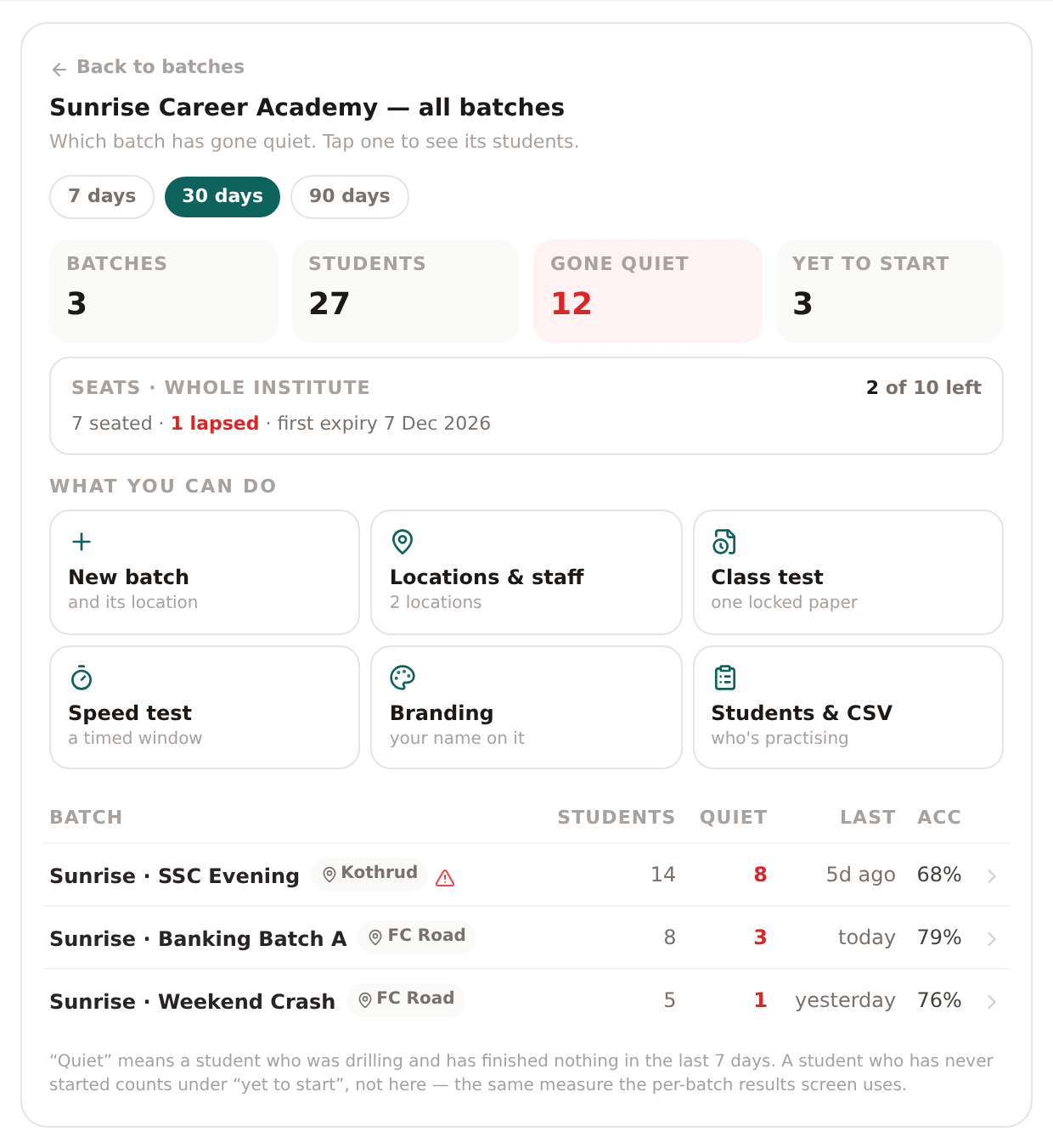
A chain running several branches gets this above the per-batch consoles: which batch stopped, not a longer list of students.
- The evening batch is flagged because its 14 students hold no seat — being taught, not counted.
- Tap any row to drop into that batch's console.
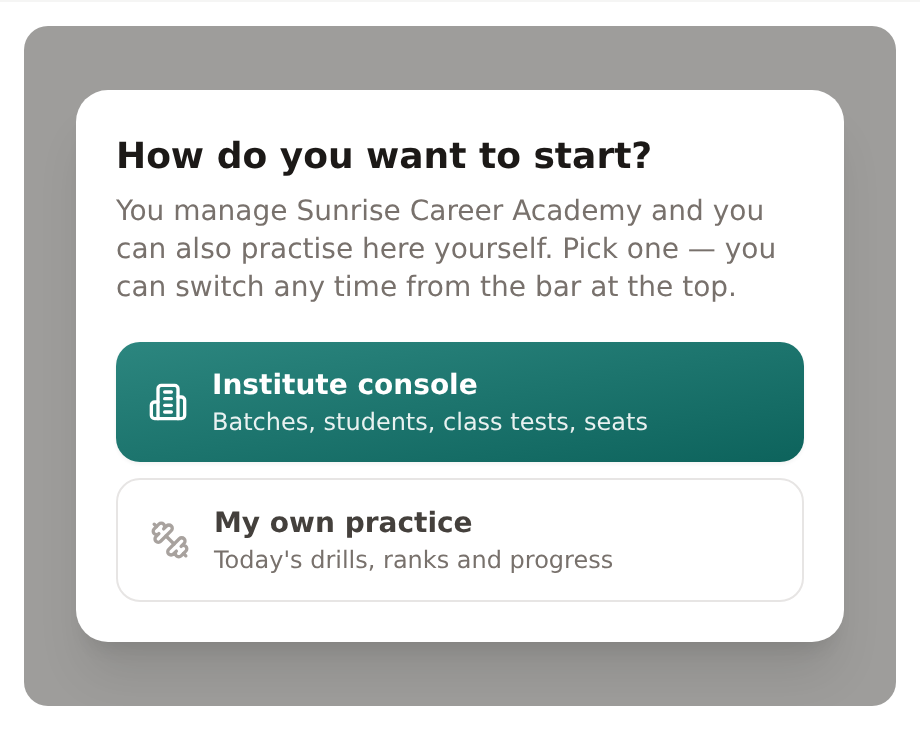
Asked once, remembered after.
- Your account is a teacher's and a player's, so we ask which one you are here for instead of guessing.
- The answer decides which menus load.
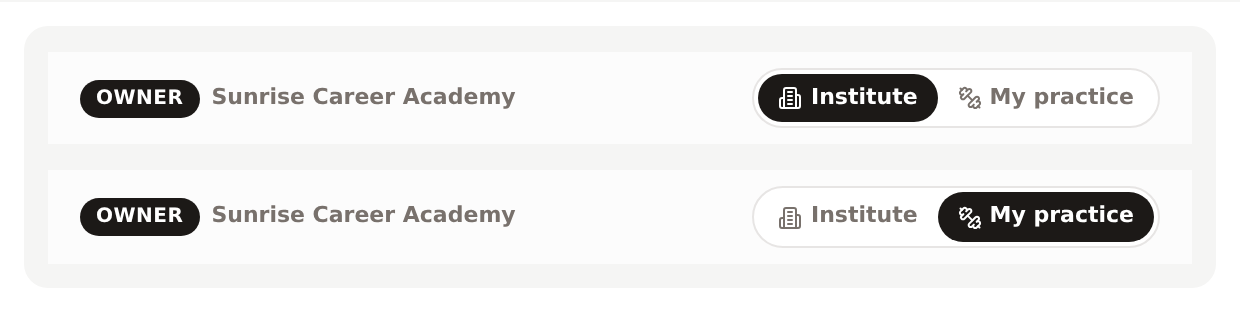
The bar sits above every screen.
- It names the role your account carries — owner, or location head for a branch manager who only sees their own.
- It flips between the console and your own drills in one tap.
- Nothing is hidden behind the choice; it only decides which app you land in.
You attach your own batches to your institute yourself — no email to us, no waiting — and the roll-up only ever shows batches you own. Adding a location head, setting the branding and attaching a batch are owner-only, on the server as well as in the menus: a location head who calls the same address is refused. What still runs through us is the commercial side — buying a seat block, an invoice, a renewal.
For teachers — one batch, one row per student, and the Friday test
A teacher is whoever created the batch, or the location head you put over that branch. They get the console for their own batches and nothing beyond them: no other branch's students, no seat purchasing, no staff list. Their whole job on this product is two screens.
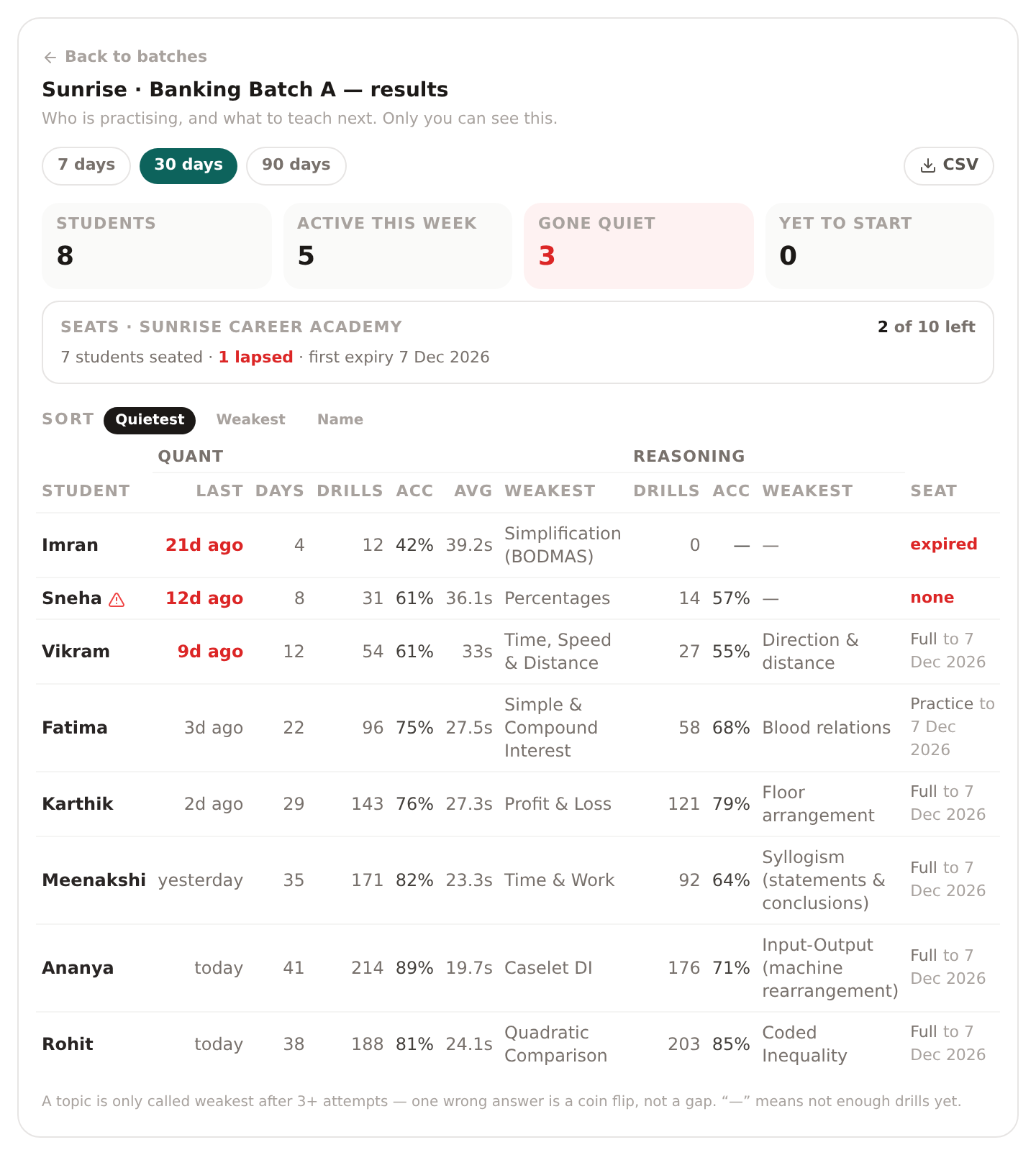
Sorted quietest first, so the three who have stopped are the three at the top, not buried under your best performer.
- Rounds, accuracy, average seconds, days practised, days practised in the last 7, last seen, weakest topic.
- The seat strip says 2 of 10 left before the eleventh student is turned away at the door.
- CSV export sits top-right, for whoever asks you for a report.
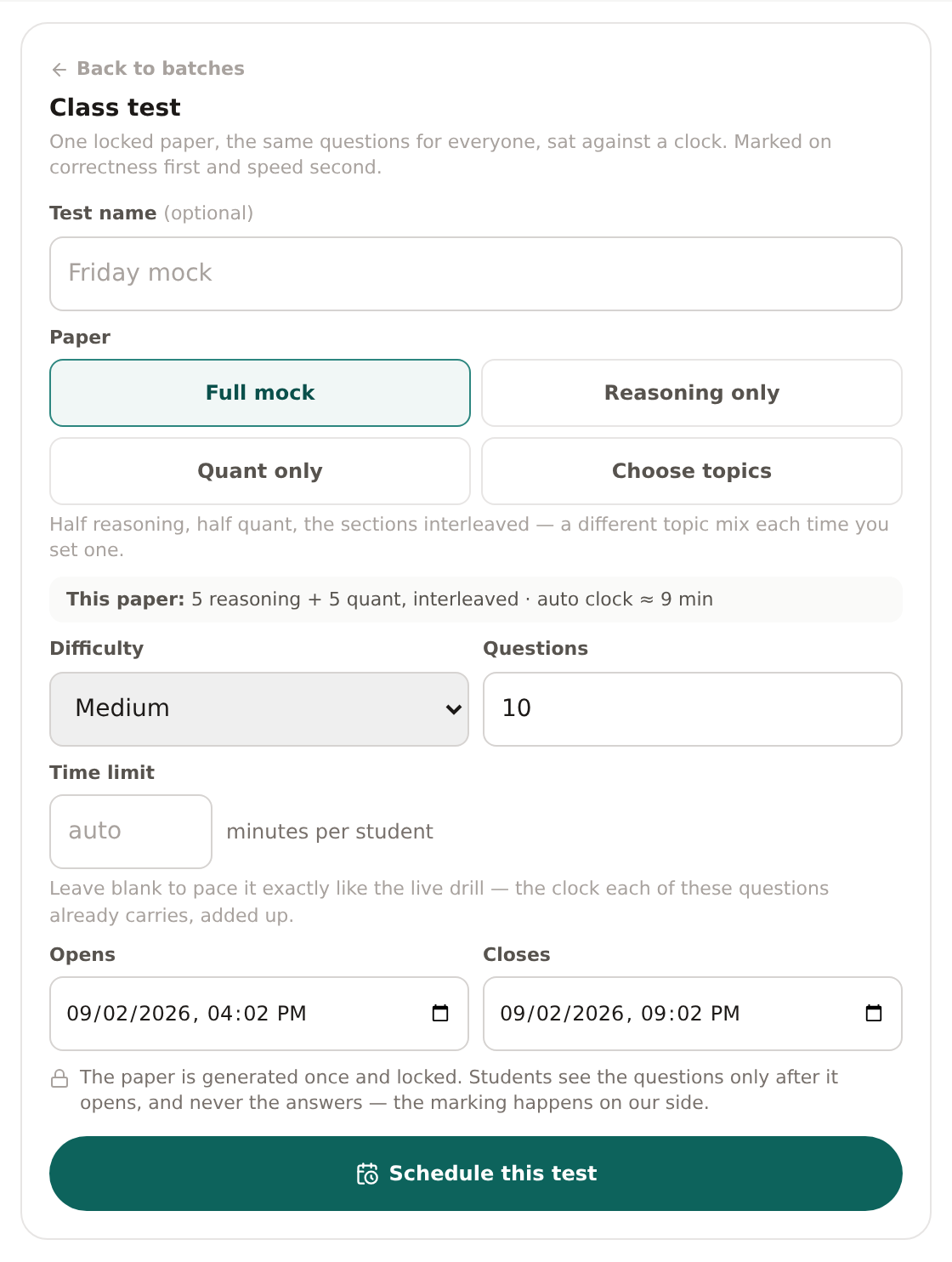
Name it, pick the paper and the difficulty, set a window, schedule.
- The paper is generated once and frozen, so the student who sits it at 6pm gets exactly what the 9am student got.
- Students see the questions only after it opens, and never see the answers — the marking happens on our side.
- Correctness first, speed as the tie-break.
The limit is enforced where it counts. A location head who opens a batch outside their own location is refused by the server, not merely shown a smaller menu — the same check guards the console, the CSV and the class test.
For students — honestly, one thing
We would rather you hear this from us than find it out in a click. Almost everything your students see is already free to anyone who signs in, and a seat does not gate it.
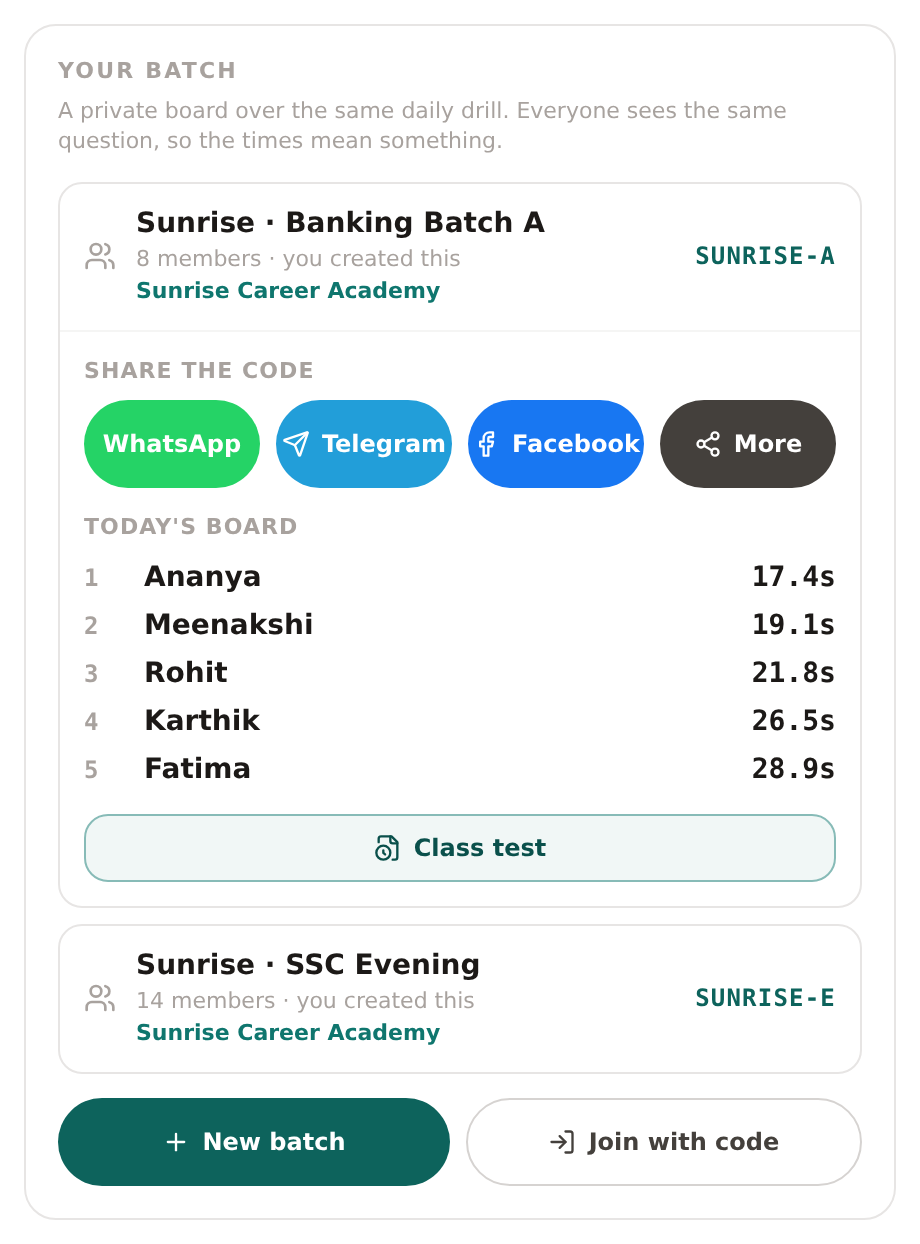
One join code, shared to your batch's WhatsApp group in a tap.
- Today's board is the same drill for everyone, so the times are comparable.
- Your institute's name sits on the batch — that teal is one hex code you set once.
What the seat actually adds: the daily practice meter is lifted from 20 drills a day to 100. That is the whole student-side difference.
Free to everyone anyway, seat or no seat: the daily drill, progress history, and the Veda help widget. A seat does not gate these and never will — free adoption is what makes the batch record worth reading. The full drill archive is not part of a seat.
Which is why the pitch is the console, not a student perk. If a student can get it free by signing in, we are not going to sell it to you as a benefit.
Prices and the trial
Published once, on nipunta.com
Per-seat prices, the volume rungs, seat terms, the free trial and the Founding programme are on the programme's own page, nipunta.com, and nowhere else — one card, so the number you read is the number every rep quotes. This page is the Quant Daily half of the seat, photographed; the reasoning half is below.
The other half of the paper
The reasoning section comes along
Deduce — the reasoning app at deducepuzzles.com — runs one fresh reasoning puzzle a day, every one machine-proven to have exactly one solution: seating arrangements, syllogisms, blood relations and 26 more — 29 prelims reasoning types in all. Be exact about what you are paying for, because the practice is not it: the daily is free to everybody, seat or no seat, exactly as the quant drill is. What a seat buys on this side is the same thing it buys on quant — the measurement. Your students’ reasoning drills, accuracy and weakest topic come back as columns on the same console row as their quant and in the same CSV export; a scheduled class test is dealt from both pools rather than quant alone, split evenly between the sections. If Deduce cannot be reached we show no reasoning columns and say so on the console — never a zero, because a zero would read as “they did not practise.” Sold as one programme under its own name: Nipunta.
Next step
Talk to us
Seats are sold by conversation, not by checkout — it takes one short call to size a block and set your batch up. Here is the whole of it:
-
You message us
WhatsApp, a call, or the form below. Tell us roughly how many students and which exam they are sitting.
-
One short call
Forty-five minutes: we set up your batch, your branding and your free link, and show your teacher the console on your own students.
-
A pilot on your own students
Real students on real seats. The trial is free, and its size, its length and every price are published once, on nipunta.com. The clock starts at activation, not at the call.
-
Then you decide
Buy a block or don't. Nothing renews on its own, and there is no card on file to cancel.
WhatsApp or call +91 80742 70226
Email [email protected]
Prices, the trial and the Founding programme: nipunta.com
Or leave your details and we'll call you
One working day, usually the same day. Nothing is charged and nothing is committed — the first call is just sizing the block.
Got it — we'll be in touch. Usually the same working day. If it's urgent, WhatsApp +91 80742 70226 and we'll pick it up there.
Already have this one. We've got your enquiry and we'll reply — no need to send it twice.
That didn't go through. Check the email or mobile number and try again — or just WhatsApp +91 80742 70226.
Curious what the students actually see first? Try today's drills — free, no account, about five minutes.